DevPocalypse : A *Basic* Asp.Net MVC + jQuery Game
12 Dec 2008Last weekend I had the privilege of speaking at the second Northern Virginia CodeCamp of the year, thanks to an invitation from Jeff Schoolcraft. For those of you who were able to make it to the event, thanks for attending, and make sure to fill out an eval! For those of you who didn't make it (or those who did and want a deeper peek at the code I presented), feel free to check out the code to my sample app & posted below.
DevPocalypse (ASP.NET MVC + jQuery = Simple Multiplayer Action)
The basic idea of the game is that multiple players can exist on a grid (a "screen") and move around to unoccupied spaces ("blocks") adjacent to their current location. I had grand hopes of being able to click another player to attack them and include some basic chat, but alas, it was not meant to be. At least not for this presentation. My hope is to continue working on this as a single sample app I can use to illustrate various MVC techniques for future speaking engagements.
Let's take a gander at what the app looks like when it is running:
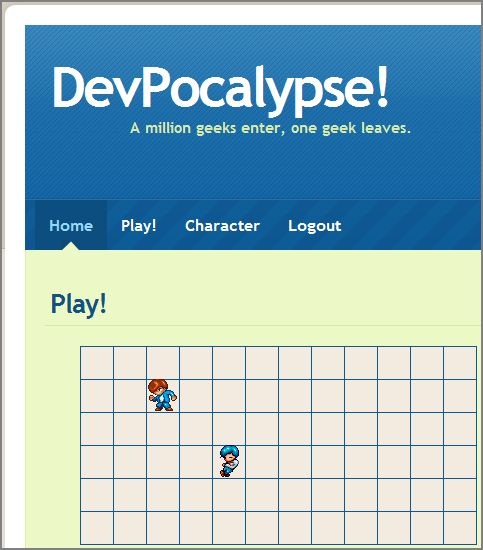
Yup, like I said: basic. So those two little guys are players. You can't see it in a screenshot, but when you click a square next to where your player is standing, jQuery will smoothly animate the transition of your character from the current block to the new block. What is even neater is that when a player on a different computer moves their player, you also see the same jQuery animation execute. How are we doing this? Well first we use a simple polling script (from Game.js):
Ultimately, this code calls an action named GetCurrentScreen on the GameController. Currently this executes twice a second so as to be nice and responsive, but of course I have no idea how that would handle under load. Here is the entire GameController class:
Pretty simple, huh? Note how nice and easy it was to return an anonymous type as a JSON (JavaScript Object Notation) object via the Json(obj) method. Finally, here is the bit of Game.js that performs the actual animation (this is done in a loop updating all characters – hence the id and c variables):
Gotta love jQuery. :-) There is plenty more to look at in the source, so feel free to download it, check it out, play around with it - use it for whatever you want.
Thanks, and I hope to see you at the next CodeCamp!